Red's Neolinks
Latest Update: 5/10/2026. Added InputKey (a beginners' HTML/CSS guide).

What is Neopets?
Neopets is a free-to-play browser game introduced in 1999. You adopt a critter (or critters) of your choice, and you can change their appearance through various means. It was popular in the 2000s, largely with children, due to its variety of free flash games, and still exists to this day.
Read more
In the modern day, it's an interesting relic, with over 25 years of strange creative decisions, lovingly made game-within-a-games (a simple tycoon game, an entire RPG, a Minesweeper analog, etc), things to do, and things to collect. It also has a kind, enthusiastic, vibrant community full of neurodiverse people (I like to joke that you can't throw a stone in a crowd of Neopets fans without hitting an autistic person, myself included), LGBT people, and/or creatives, most of whom are adults despite the site's kid-friendly vibe.
There are currently two associated mobile app spin-offs (Tales of Dacardia and Faerie Fragments). These are mostly dull but will give you onsite goodies (if you care) if you make a NeoPass and connect your account.
There's a lot of attempts at monetization (some may say excessive) by the current staff, and so I recommend you use an adblocker - additionally, some of the game's mechanics are a bit bewildering (half the site is stuck in an old layout), so it has somewhat higher "friction" than you might expect from a more modernized website. Some might be interested despite these hurdles, and hopefully these resources help.
(By the way, yes, you can still play the flash games, most have been converted to HTML5.)
If you're new and want a good place to start, check out Jellyneo: Neopets for Absolute Beginners.
If you hate all this new stuff like customization and ads and wish Neopets was like the good old days, try to get an invite to Grundo's Cafe or a similar fan-run "neoclone".
What is this page?
This is Red's Neolinks, a site for Neopets beginners and veterans alike. Because Neopets has been around for a long time, it can be difficult to navigate the resources because of how spread out they are on the internet. Sometimes, even well-familiar fansites can have pages tucked away you've never seen. I decided to compile the resources I've personally found useful, in the hopes others will benefit.
The exclusion of a resource does not mean I dislike it or find it inferior. Just means I haven't personally used it. This is not a "every relevant Neopets link ever" site, it is a "Red's favorites" site.
Who are you?
I'm Red! I am a 33-year-old artist who first played Neopets when I was a little kid. I like Aishas, they're my favorite. If you find something you liked on this page or just want to say hi, find me on Neopets or on Bluesky (not safe for kids, occasional bawdy humor).
Links
General Helpful Sites
Jellyneo - the absolute best resource for Neopets on the internet. News and guides.Useful Jellyneo info
Jellyneo has sub-websites for items, lore, cosmetics, Battledome, onsite images, and official merch.
Jellyneo wishlists can be used for tracking items as well as trading purposes. I highly recommend making an account to use them. It also has a Dailies page that, with an account, can be customized to your liking.
itemdb - has info on Neopoints and Neocash (pay) items both. Can sometimes be more accurate than Jellyneo, especially for high-price items. Highly recommend the feature to check an item's historical auctions and trades.
The Daily Neopets - I don't use this one much but has some useful utilities.
r/Neopets subreddit - Surprisingly nice for a subreddit. Well-moderated, useful daily/weekly megathreads. Has a great Discord community.
Neopets Official Support - Mostly useful for information on recent events or pay items.
Neopets Official Fan Site Directory - other trusted fansites I didn't list here because I have no experience with them.
Neopets Ambassador program - official Neopets Ambassadors (fan volunteers) who correlate feedback and send it to TNT. Send POLITE grievances and suggestions here. They're just regular users who do not deserve ANY ire for Neopets team decisions.
~Petpage - an expansive list of onsite Neopets petpages and resources organized by a single user!
~Kalux - another user-curated list of petpages and resources!
Sparkylinks - a fan-made dailies page.
The Neopian Calendar - official calendar of Neopets with every event and pet day. Also see Jellyneo article.
Pet Creation
Lost and Pound - a fan-sourced list of pets "stuck" in the pound and ready to adoptr/neopets daily UFT/UFA threads (up for trade/up for adoption)
~Furknot - untaken pet names
~Fenky - untaken pet names
~Blormbi - untaken pet names
~Zharming - even more untaken pet names
neoquest.guide Name Generator - Highly customizable name generator. Will both generate names and check if they're taken.
Jellyneo: Rainbow Pool - a means to view all pet/species combinations. Some colors are lab-only (cannot use a paint brush to obtain, but depending on the color may be available through other means - check the article's Exclusive Colors section).
ItemDB: Rainbow Pool Tool - shows you the cheapest means to obtain a pet/species combo you're after.
Pet Customization
Note: Pet wearables are divided into Neopoint/NP (made-up site currency) and Neocash/NC (costs irl money).Dress to Impress - database of every wearable, NP or NC. You can plan outfits here even if you don't own the items or pets!
Sunnyneo: Wearables HQ - tool sorting wearables by theme, color, etc.
Jellyneo: all Neopoints clothing that isn't paint brush clothing, newest first - Find cool new stuff that doesn't cost IRL money here.
~Orneight - index of all Neopoints wearables that can be equipped by any pet.
~Ottrageous - index of all Neopoints wearables specific to individual pet species.
ItemDB: Species-Exclusive Clothes - NC and NP species-exclusive wearables all on one page.
~Jaeckel - fan-made Spooky Wearables Megalist (NC and NP)
~Perpetrated - a means to glitch wearable items to layer them. Temperamental and may not always work.
~Styence - another guide on glitching wearables.
Neocash trading primer
Neocash (pay currency) items are obtained in the NC Mall. They are mostly wearables. Releases are typically themed items sold in gacha capsules and retired after a month or two. Neocash items cannot be traded for Neopoints items or vice versa. I can't explain all the intricacies of NC trading here, but Jellyneo has a guide, as does Stylisher, and the NC Trading neoboards or #nc-chat r/neopets discord channel are always willing to answer questions.
Basically: All Neocash items cost gift boxes to send to other players. Gift boxes can be gotten from gift box capsules or Trudy's Surprise. Gift box capsules (GBCs) contain gift boxes and thus are the de-facto currency. Most (but not all!) items are worth 1 GBC. Not everyone accepts them, some prefer item-for-item trades.
Items are generally valued according to a fan-collected resource, Lebron, based on historical trade information. Other sites have taken up this mantle in the past such as Owls but are now retired. Some may disagree with these values, especially depending on supply and demand. Stylisher can be used to view trade reports as well as values of tokens.
Trading is often done by sharing Dress to Impress wishlists on the NC Trading Neoboards or the #nc-trading portion of the r/neopets discord. Jellyneo wishlists are also used. You can list your username on either one to receive neomail inquiries or make neomail inquiries of your own. Tokens cannot be listed on DTI wishlists, only JN ones.
Tokens are like a whole weird thing. Basically they're fancy art for your Neopet but you can't put clothes on them, just background/foreground elements. They also have a gacha element to obtaining them and are rotated out periodically. A lot of them are based on nostalgic old art ("unconverted" art, leading to the now mostly-irrelevant term NC UCs) from before the site made its modern customization conversion. I don't really mess with tokens, so good luck there.
Lebron - fan-maintained Neocash (cash shop) wearable value guide, currently integrated into itemdb.
Stylisher - view Lebron prices, historical NC trades, and token prices.
A word on NC spoilers
It's fairly common practice for items to be spoiled before they come out via intrepid users looking for newly uploaded files. Here are some regularly updated resources. General etiquette is not to talk about these outside of spoiler-friendly spaces (for example, the NC/Wearables Spoilers thread in the r/neopets discord). This includes seeing a spoiler and pretending you didn't, like (guy who saw Valentine Elephante spoiled early voice) ooh hehe I bet the new Elephante Day color is Valentine! Just be courteous.
~Spoilerss - general NC spoilers. Sometimes includes tokens. Usually does not include Dyeworks.~Dyeworking - Dyeworks spoilers.
~Cosry - tokens spoilers.
For the most up-to-date spoilers and previews check the aforementioned discord thread. Sorry, I'm not a fan of "check the Discord!" for everything either, but it's the resource I'm aware of outside of these three petpages.
Petpets
~Whitsbury - all petpets divided into categorization (canine, feline, etc).Sunnyneo: Petpet Puddle - utility to display all petpets of all colors. Some petpets are lab-only.
Jellyneo: Lab-only petpets, unpainted petpets, unpaintable petpets, unreleased petpets (#ReleaseOldChap).
Sunnyneo: old petpets - no longer obtainable, but if a pet has one equipped, it'll stay there.
Jellyneo: Petpetpets - note the instructions for attaching a petpetpet. The "star method" makes it much more painless these days.
~Tinanisha - fan-run resource for matching petpets to pet colors
HTML Customization
A word on Neopets HTML
Neopets allows for the basic customization of many of your pages using HTML and CSS (no javascript). This includes your userpage, your shop, your gallery, and your pets' pages. All of it is malleable so long as you leave important information intact. Notably, every single Neopet can have its own "pet page" that you can use for whatever you want. That means a user with all of their pet slots can potentially have over 20 original webpages hosted on Neopets. Many people get very creative with this, even turning their pages into resources for other users. If a page on here has an ~, that's a petpage.
That said, most of the HTML/CSS allowed to you is rather antiquated! You won't find any Webkit features here. The fanciest layouts make ample use of what the community refers to as "anchor links" (guide). My advice is to start with premade layouts to get an idea of what is possible, and not to get too frustrated if Neopets eats a chunk of your CSS when you go to save it.
Also, you will notice that Neopets gets funny about certain characters being adjacent to HTML, like quotation marks. Use a blank Unicode space like this one to get around that - put it between the quotation mark and your HTML.
Neopets images - official Neopets animated gifs you can use for whatever purpose.
Neopets "shop blogs" - premade HTML art boxes you can use in your shops or elsewhere.
Dr. Sloth - a Jellyneo-run site cataloguing every image on Neopets (useful for decorating pages, edits, etc).
Gifcities - an archived collection of gifs from the Geocities era. Not technically related to Neopets, but adjacent vibe. Not always safe for work.
Sunnyneo - Check the "Graphics" tab. Wide variety of prefab resources including premade layouts of all kinds, HTML/CSS snippets, backgrounds, blinkies, etc.
Petlookup Image Fix - if you're tired of some items not showing up properly on your pet, or just generally dislike the animated pets and want to replace them with a nice, clear static image, use #2. Your pet's name in the URL is case sensitive! For a pet like Necromitzi, cpn/Necromitzi/1/5.png will work but cpn/necromitzi/1/5.png will not.
~InputKey - HTML/CSS coding guide AIMED AT BEGINNERS. Very helpful resource!!
~Maplebriars - HTML/CSS coding tutorials and snippets.
~whispywill - useful HTML/CSS snippets.
~Ahrila - simple code to change it so all of your pets appear on your lookup in a grid without having to press scroll buttons.
~Develops - custom Dyeworks pets. Allows you to use HTML/CSS to alter the color of individual layers of your pet's customization.
~Kyriient - add custom gender flags to userlookup or pet lookup and other fun gender tricks.
~Odinorth - premade layouts and useful HTML/CSS snippets.
~Niwi - premade layouts
~Xaia - premade layouts (minimalist)
~thatkillsme - premade layouts (you will have to put a period in the credit because Kill is a filtered word, e.g. "credit to thatk.illsme".)
~jiethe - premade layouts (mostly minimalist)
~htm1css - premade layouts
~Liliahn - premade layouts (old images but code still functional)
~castellate - premade layouts
~Softball - simple premade pet lookups
~Gheggis - replace your shopkeeper with a custom shopkeeper
~lshvi - A resource for Unicode characters usable on the Neoboards (and by extension, petpages, lookups, etc). These are important because while some Unicode characters may appear to work in previews, when you go to save them, they will eat your HTML, which is very annoying.
~blauenc - Another resource for Unicode characters.
Note on Gheggis and replacing gallery keeper
In this fix, you will have to replace the "<div align="center">" tag with a "<center>" tag. Additionally, you'll notice what I mentioned about Neopets not liking putting quotation marks up against HTML tags. Put a blank unicode space between your quotation mark and HTML tag. Finally, if you want to use this code, due to the trick used to hide the shopkeeper image but preserve your item images, any image with a link will be constrained to 80px by 80px!
If you want to replace your gallery keeper go to your gallery, tick "Do NOT display Gallery Keeper to visitors", then just do something like this.
...Replace "EGG" with the blank unicode space mentioned above.
Adoptables
A word on adoptables
If you are younger you may be unfamiliar with this term, especially as it has taken in new meaning in the modern day. While "adoptable" nowadays typically refers to a character design that you pay real money to own, back on web 1.0 websites, adoptables just meant a cute premade drawing you "adopt" by putting it on your webpage with a link back to the creator, with no limit to how many people can adopt the same adoptable.
Many (myself included) make adoptables in the old sense to this day as a nostalgia thing. So if you hear "adoptable" (adopts for short) mentioned on Neopets, it is not referring to any exchange of real currency.
~projectstar2 - adoptables of every species
~tilarei - adoptables of every species (Varwolf excepted)
~Oatcy - adoptables of baby pets but mostly HOLY SHIT CUTE THEY'RE SO CUUUUTE
Sunnyneo: Adoptables - Sunnyneo has a wide variety of adoptables, mostly pixel art.
~Catabunga - Aisha pixel adoptables (I made this one.)
~Bonkbinkbunk - Pteri pixel adoptables (and some petpets)
~Aadala - Uni pixel adoptables
~breeziebabe - Usul adoptables
~tomysu - Varwolf pixel adoptables
~Double_Agent - Zafara pixel adoptables
Resources for Creatives
A word on contests and image compression
Neopets comes from the days where 500kb images were considered inconsiderate to post because they took so long to load. For reference, your average Youtube video soaks up several times that per minute.
As a result, it has draconian image compression requirements that haven't really been updated. There are two primary Neopets art contests - the Art Gallery (staff curated) and the Beauty Contest (user-voted). You can find more about the exact requirements through those links but basically they are a 78kb and 75kb limit, respectively, and require either GIF or JPG format. 600x600 is the max for art gallery, beauty contest has no max resolution but again is limited by 75kb filesize. Images not in a square resolution may get a little scrunched, so keep that in mind. Animated GIFs are allowed.
(Images on your petpages, userlookups, etc are not subject to any of these restrictions. Use PNGs to your heart's content.)
The art gallery goes heavy on "themes" - general submissions aren't as likely to get in as, say, submitting Buzz art for Buzz Day. You can find upcoming themes on the Neoboards. It has like some weird best practices for maximizing the chance you get your entry in and I'm not really familiar with them. I think you're supposed to submit like the morning of? Jellyneo has information on this.
The Beauty Contest I am more familiar with. It is a popularity contest and has nothing to do with art quality. I put hours of blood sweat and tears into both making a piece and advertising the hell out of it, only to have it come 2nd place to something traced off of official art, submitted by the owner of a particularly large guild. I later submitted a shitty doodle for the same pet, barely advertised, and got first place easily. Please god do not base your self-esteem on this shit lol.
Your best bet is to post on the Neoboards in the Art section, put a link in your Neoboards signature and post elsewhere, send the link to your friends, and post it in your guild. You cannot advertise it offsite (e.g. social media or public discord channels). I also like to put a link to my entries in my Neopets shop. Put a larger version of your art on your petpage if you like.
If your entry isn't uploading despite being the right filetype/size requirement, try opening it in a different program (like Paint) and saving it again.
If you have any questions or concerns then ask #creative on the r/neopets discord or the Art neoboard.
CLIP STUDIO PAINT USERS
I got this info from someone on the neoboards and I am legally obligated to pass it on. (Don't forget to resize your image BEFORE compressing.)
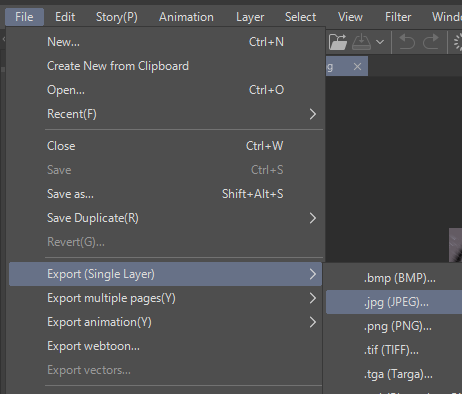
This will bring up a file save prompt. Save your file and some JPEG export settings will pop up. The only thing you need to touch is this:
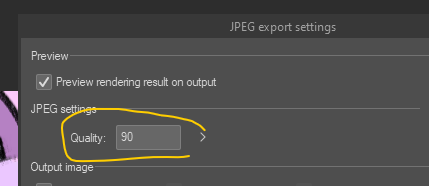
Start at 90, hit OK. It will tell you what the filesize will be. If it's over the limit, go back and lower the quality to 80. Then 70, etc. This is how you compress JPGs in CSP and they will look buttery smooth with barely any compression.
~Helpy - unspoken Beauty Contest rules.
~Snapsdile - Beauty Contest Vote And Run. A site that allows you to easily click through and vote for every species. (Missing Varwolf.)
~SafetyChia - How I Pitched My Design To Neopets And You Can Too. (I wrote this one.)
~colorful - Fan Design compendium
~Bonkin - Caption Contest rules
Official Neopets Fanart Program - officially-endorsed fanartists you can commission art from! Neopets periodically opens applications to this program if you're an artist who's interested!
Fan-Run Neopets Fanart Program - run by Sosu with Neopets' blessing, this is another place to buy beautiful art! Easier to get into especially if you're a smaller artist, applications are open year-round!
Userscripts and Similar
A word on userscripts
So what are userscripts? Userscripts are fan-written scripts that inject Javascript into your browser to accomplish various things. Only install userscripts you trust. You will need to install a browser extension like Tampermonkey. If you have an Android device, Firefox Mobile allows extensions. I think Tampermonkey has an iOS version that costs money, don't know how well it works.
Some may have questions about the legality of userscripts. The official Neopets Team word is that these are unapproved - you use these at your own risk. The actual reality is that a sizable portion of the community uses extensions and has for years.
The general community consensus is this:
competitive advantages over another player (e.g. highlighting items in a Neopets shop): not allowedanything that assists with simple tasks you'd do anyway (e.g. Wishing Well autofill, Shop Wizard lookup): allowed
The r/Neopets discord maintains an "Approved Userscripts" thread under #coding, with scripts generally considered to be safe.
Userscript: Neoquest.guide's userscripts - I recommend Quickstock Helper and SDB Sorter. Also has helper scripts for Neoquest I and II that are essential if you want to play that.
Userscript: Red's neopets userscripts - all of these are silly visual changes, like putting your pet in a sports car in the battledome, or replacing the Defeat message with "wasted".
Userscript: Lebron NC Values - extremely useful for NC traders specifically. Will automatically put Lebron values on pages like Jellyneo and Dress to Impress.
Userscript: ItemDB's userscripts - specifically, I recommend SDB Pricer, which will list ItemDB's estimated prices for every item in your Safety Deposit Box.
Userscript: SW Price Memory Utility - lists the last Shop Wizard price you personally recorded on items in your shop/SDB. Might have to add this one into Tampermonkey manually.
Userscript: Autocomplete Disabler - prevents autocomplete/autofill suggestions for things like haggling or pricing items.
Userscript: Shop Till Max Withdrawal - sets your shop till Withdraw box to the amount of NP in the till.
Ruffle - open source Flash emulator browser extension. Existing built-in Ruffle support allows most old Neopets flash games to work out of the box without this extension, but this will let you view unconverted Flash oddities like Tarla's Treasures.
Neopets Dark Mode - a Dark Mode for Neopets, by Neoquest.guide. Requires a browser extension like Stylus. Installation instructions are on the page.
How to block Neopets ads on every platform including mobile - I wrote this one. Please use an adblocker. It's ALWAYS ethical.
Fun
Jellyneo: that time Adam, the original creator of Neopets, went insane over NFTsJellyneo: unreleased items
Jellyneo: old pet art
Jellyneo: scrapped paint brush colors
Pet sizes according to the canon height numbers given - deeply horrifying, dubiously canonical
~Actuality - documentation of various glitched Neopets
~notdril - tnt orders me to take off my smile withme mask and im wearing dr sloth makeup under it. everyone on the neo boards groans at my garbage
Neopets School - a powerpoint stream I did for charity in 2025. Covers a brief history of Neopets, various scandals, and other oddities.
Miscellanea
neoquest.guide - guide to Neoquest and Neoquest II, the on-site RPG. For Neoquest II you'll need to use Jellyneo maps. Also has userscripts for both games (highly recommended if you're going to play them)Datamined Alien Aisha Vending Machine odds - in other words, always use 6 lever pulls, 3 large button presses, small button color/presses irrelevant. If you're going for the trophy, use the nerkmids at the end of the list (Platinum Nerkmid X/XX) for higher money scores, but paint brush odds are even across all nerkmids.
I do not know where else to put this: if you use a Nerkmid, you can refresh your browser to keep consuming Nerkmids of the same type in your inventory with the same choice selected. You don't have to dial in every single Nerkmid by hand.
~WhatMeow - Plushie Tycoon guide (thorough)
~Imegine - Plushie Tycoon guide ("I just want the avatar")
Jellyneo: Editorial Database - every question that's ever been asked of the Neopets staff in the Neopian Times editorial. May have conflicting answers.
Jellyneo: Shop Directory - every official shop on Neopets. You can click to view every item that stocks in that shop in the item database.
Jellyneo: New Account Restrictions - stuff that's often not clear for newbies, like restock limits and pound transfer rules.
TDN: Mysterious Negg Cave Puzzle Solver - for when you have a migraine and want to solve the damn puzzle
TDN: Top Gamer games - if you're trying to get the Top Gamer avatar (250 game scores sent), this will tell you what games you haven't played.
Jellyneo: Avatar Checklist Tool - automatically checks every avatar you're missing and tells you how to obtain them.
Sunnyneo: Bank Interest Calculator - pretty much what it says on the tin.
Sunnyneo: Shop/Gallery Upgrade Calculator - tells you how much it would cost to upgrade your shop/gallery to a certain number.
Faerie Fragments guide - guide to the Neopets: Faerie Fragments app that gives you some goodies onsite. I wrote this. If you're looking for guides on the apps, Jellyneo has good ones (don't sleep on the event prize shop guide for Dacardia).
r/Neopets Food Club bets. I do nsheng aggressive. Not super relevant unless you have an older account but if you do, easy free neopoints.
~Leaurant - guide for cheap Battledome builds that can farm opponents with no room for error.
A word on battledome
I feel weird *not* talking about Battledome because it's one of the most overlooked dailies (particularly if you have Premium) and it really is way more simple than people make it out to be. Jellyneo has a basic guide here.
The only problem is what equipment you want kind of varies? If you have some points from the Void Within plot, just get Thunder Sticks, Grapes of Wrath and Wand of the Dark Faerie, in that order. Buy a Leaded Elemental Vial and MAKE SURE TO EQUIP IT, NOT USE IT, because for some reason it can be consumed like a potion if you just select "Use"??? If you equip it you can just use it infinitely in-battle as a once-per-battle heal that will heal you to full.
If you don't have plot points (or don't want to spend them), there are some good cheap weapons. Leaurant is a good place to start. You can also ask in #battledome or on the neoboards to tailor to your budget, or check Jellyneo's weapon recommendations. You want two weapons (for example, this would be Grapes of Wrath and Wand of the Dark Faerie if you have them) and ideally a freezer (Thunder Sticks, or something cheaper like Sleep Ray).
Your goal is to train upward, starting with the Swashbuckling Academy into the Mystery Island Training School, keeping your pet's stats well-rounded (Jellyneo has a guide on how to do that but basically train every stat to your level X 2, level 25=50 str, ignore Movement if you want because it's glitched). Level 50 should be your first goal because you can learn the ability Lens Flare.
The meta goes like this: attack on turn 1 with weapon+freezer+Lens Flare. They will be immobilized by Lens Flare on the first turn, and the freezer will immobilize them for the second turn. Then you attack with weapon+weapon+whatever ability. With an OK amount of strength, a lot of battledome opponents will crumble with three turns of damage, and they'll be unable to attack you back.
Honestly, for most people and most opponents, that's good enough! You can now farm battledome opponents and get a bunch of goodies every day! If you're premium use the premium dome opponents, whichever one you're strong enough to beat - you can either wail on Jetsam Ace or try the rotating opponents if you're strong enough to fight whoever's dropping an album item that sells well. Otherwise check out this guide on opponents and drops.
If the plot is active you can beat up plot baddies too for points and profit. Generally speaking, fight normal BD enemies first then once you hit the limit (15 items) go for plot baddies (15 more items for plot baddies).
Wow you made it this far. Um, thanks for reading!